Most small companies don’t design a network.
They accumulate one.
A router from the ISP.
A switch someone bought years ago.
Wi-Fi that “kind of works.”
A server that lives wherever there was space.
And somehow, it all still “functions.”
Until it doesn’t.
This post is not about enterprise-scale complexity.
It’s about what reasonable looks like for a 10–50 person company that wants stability, control, and the ability to grow without fear.
No buzzwords. No diagrams for the sake of diagrams.
Just structure.
The Goal (Before We Touch Any Tech)
A proper network for a small company should do three things:
If your network does those three things, it’s “good enough.”
Anything beyond that is optimization.
The Core Principle: Separation Beats Perfection
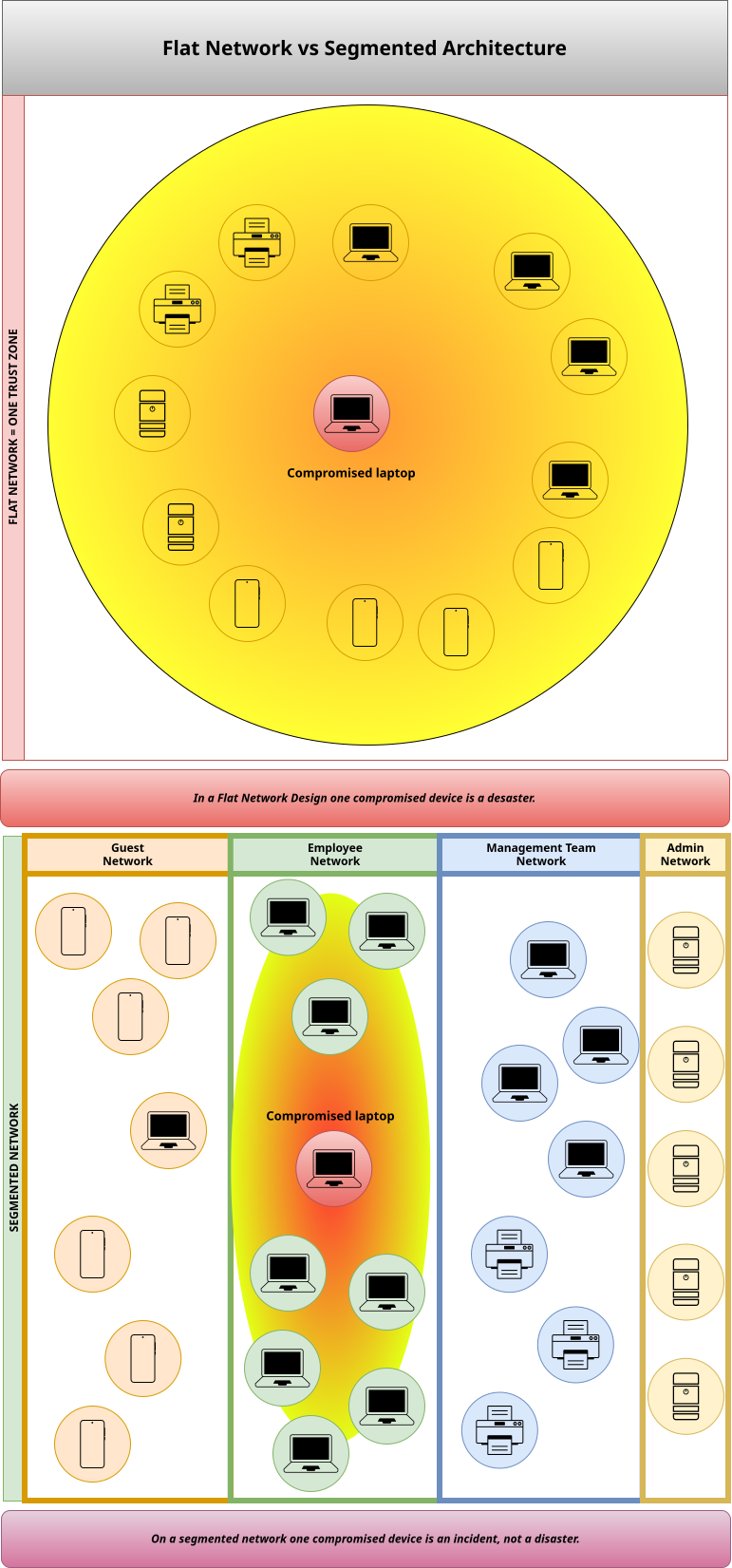
Most small networks fail because everything lives together.
Same network for:
That’s not simplicity.
That’s fragility.
Proper architecture starts with segmentation.
Not VLAN cosplay.
Real separation with intent.
The Minimum Viable Segmentation
1. User Network
This is where people live.
Rules:
Default stance: users are consumers, not administrators.
2. Service Network
This is where work actually happens.
Rules:
This is not “the server room.”
This is the business brain.
3. Management Network
This is where power lives.
Rules:
If users can “just open” admin interfaces from their laptop, your network is lying to you.
4. Backup / Recovery Network
The most ignored—and most important.
Rules:
Backups that live on the same trust level as users are not backups.
They’re future regrets.
VPNs: Not a Magic Tunnel, a Controlled Door
VPNs are often treated as a teleport spell.
“Once you’re on VPN, you’re basically inside.”
That’s the mistake.
A proper VPN does one thing:
It places you into a specific zone with specific permissions.
Examples:
If everyone lands in the same internal network after VPN login, you’ve just moved the flat network problem to the internet.
Access Control: Identity > IP Addresses
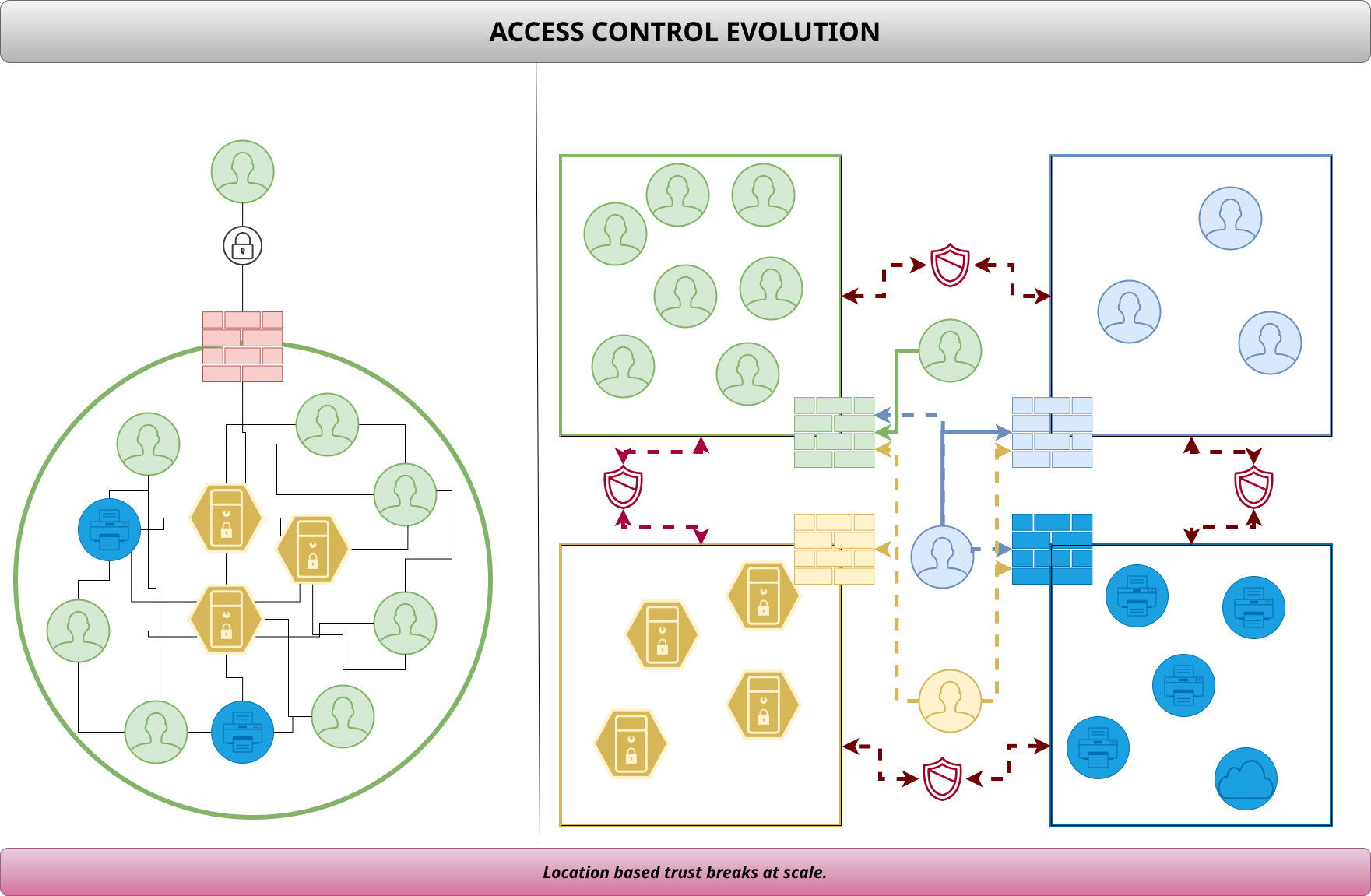
IP-based trust doesn’t scale.
People move, devices change, Wi-Fi lies.
Adult networks care about:
That means:
If revoking access means “changing passwords everywhere,” the system is already overdue for a rethink.
Wi-Fi Is Not a Special Case
Wi-Fi is just a network with worse physics.
That means:
If your Wi-Fi password gives access to internal servers, congratulations—you built a roaming LAN party.
What This Looks Like in Practice
(Without Overengineering)
For a 10–50 person company, a sane setup looks like:
Not expensive.
Not exotic.
Just deliberate.
What This Is Not
Let’s be explicit.
This is not:
It’s basic operational maturity.
The Quiet Payoff
When your network is structured this way:
Most importantly:
You stop relying on hope as a security strategy.
Final Thought
A proper network is not about control for its own sake.
It’s about making failure survivable.
Flat networks optimize for convenience on day one.
Segmented networks optimize for survival on year three.
Choose accordingly.